
Warehouse Receiving Process: What a WMS Should Actually Do at the Dock
The receiving dock is where warehouse inventory first becomes warehouse responsibility.
A truck arrives. Pallets are unloaded. Cartons are counted. Labels are checked. Damaged products are separated. Lot numbers, serial numbers, and expiration dates may need to be recorded. Inventory then has to be moved from the dock to the right storage location.
If these steps are handled correctly, the rest of the warehouse has accurate inventory to work with. If they are not, the problems spread quickly.
A receiving error can later appear as a stock discrepancy, failed allocation, picking shortage, customer claim, billing dispute, or delayed order. This is why inbound receiving should not be treated as a simple inventory update.
For a third-party logistics provider, the process is even more demanding. The same warehouse may receive inventory for multiple clients, each with different products, labeling requirements, storage rules, quality checks, and billing arrangements.
A capable 3PL warehouse software solution should control this process from the moment an inbound shipment is expected until the received inventory is verified, recorded, and ready for storage.
The real question is: what should a WMS actually do at the receiving dock?
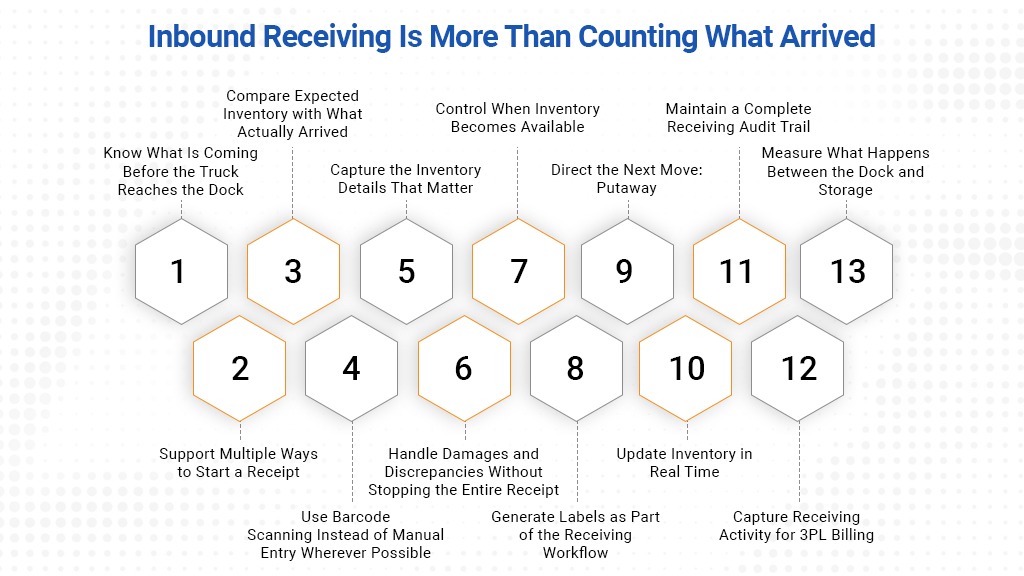
Inbound Receiving is More Than Counting What Arrived
At a basic level, warehouse receiving sounds straightforward:
- A shipment arrives.
- The warehouse unloads it.
- Workers count the goods.
- Inventory is entered into the system.
- Products are moved into storage.
Actual warehouse operations are rarely that simple.
The shipment may arrive earlier or later than expected. The quantity may not match the purchase order or advance shipping notice. Some pallets/cartons may be damaged. A product may require lot or serial number tracking. Inventory may need to be quarantined before it can become available.
The receiving process therefore has to answer several questions at once:
- What was expected?
- What actually arrived?
- Does the received inventory match the expected shipment?
- Is the product in acceptable condition?
- Which inventory attributes must be captured?
- Should the inventory be available immediately?
- Where should it go next?
- Who needs to know about any discrepancy?
The purpose of a WMS is to make these decisions part of a controlled workflow instead of leaving them to memory, spreadsheets, paper forms, and manual data entry.
Know What Is Coming Before the Truck Reaches the Dock
Good receiving starts before unloading begins.
The WMS should already have information about the expected shipment through a purchase order, advance shipping notice (ASN), inbound order, stock transfer, or another connected system.
An ASN can provide information such as:
- Supplier or shipper details
- Expected arrival information
- Purchase order reference
- SKUs and expected quantities
- Carton or pallet details
- Lot or serial information
- Packing information
This allows the warehouse to prepare for the shipment instead of discovering its contents after the doors open.
The receiving team can see what is expected, identify unusual loads, prepare staging space, and plan labor accordingly. A large palletized shipment may require different resources from a small parcel delivery containing a few cartons.
For a 3PL, expected receipts should also be associated with the correct client before receiving begins. That connection is essential because each client may have different inventory rules and service requirements.
Smart 3PL warehousing software should give warehouse teams a clear view of upcoming inbound activity so that receiving becomes a planned operation rather than a reaction to arriving trucks.
Support Multiple Ways to Start a Receipt
Not every warehouse receives inventory in the same way, and not every shipment arrives with the same documentation.
The WMS should support different receiving methods based on the operation. A worker may need to start receiving by scanning or entering:
- An ASN number
- A purchase order
- A pallet or license plate number
- A carton barcode
- A supplier reference
- An inbound order number
The system should then retrieve the expected receipt and guide the worker through the next steps.
This matters because receiving teams should not have to search through multiple screens or manually re-enter shipment information that already exists in the system.
The workflow should be fast enough for high-volume receiving but controlled enough to prevent the wrong inventory from being booked against the wrong order or client.
Compare Expected Inventory with What Actually Arrived
One of the most important jobs of warehouse receiving software is reconciliation.
The system should compare expected inventory with actual inventory as goods are received.
For every item, the WMS should be able to identify situations such as:
- Exact quantity received
- Short receipt
- Over receipt
- Unexpected SKU
- Duplicate receipt
- Damaged quantity
- Incorrect unit of measure
- Expired SKU
A weak system may simply allow a worker to enter a quantity and complete the receipt. A stronger system checks that quantity against what was expected and applies predefined rules.
For example, should an over-receipt be accepted automatically? Should a supervisor approve it? Should the excess quantity be placed on hold? Should the client be notified?
The answer may vary by customer and on the contract of purchase order.
That is why 3PL inventory management software should support client-specific receiving tolerances and exception rules. One client may allow a small quantity variance, while another may require exact matching before inventory can be accepted.
The software should make those rules part of the workflow.
Use Barcode Scanning Instead of Manual Entry Wherever Possible
Receiving is a high-risk point for data-entry errors.
A single incorrect SKU, quantity, lot number, or serial number can create problems long after the shipment leaves the dock.
Barcode scanning reduces the amount of information workers need to type manually. Depending on the warehouse and product, workers may scan:
- Product barcodes
- GS1 barcodes
- Pallet IDs
- Carton labels
- License plate numbers
- Lot numbers
- Serial numbers
- Storage locations
The WMS should validate each scan in real time.
If the wrong product is scanned, the worker should know immediately. If a serial number has already been received, the system should prevent duplication. If a product belongs to another client, the system should flag the issue before the receipt is completed.
This is an important distinction between recording warehouse activity and controlling warehouse activity from entering the wrong inventory and disturbing the entire warehouse ecosystem.
The WMS should not simply accept whatever a worker enters. It should validate the transaction while the inventory is still at the dock.
Capture the Inventory Details That Matter
Quantity alone is not enough for many warehouse operations.
Depending on the product, the WMS may need to capture additional attributes during receiving, including:
- Lot or batch number
- Serial number
- Expiration date
- Manufacturing date
- Country of origin
- Condition or quality status
- Pallet or container ID
- Custom client-defined fields
These details should be recorded when the inventory enters the warehouse, not added later from paperwork.
For example, a warehouse handling expiration-controlled products may need to prevent receipt if the remaining shelf life is below an acceptable threshold. A serialized product may require every unit to have a unique identifier. A damaged carton may need to be received into a different inventory status.
This is where the receiving process becomes the foundation for inventory traceability.
If the information is captured correctly at the dock, the WMS can later support accurate allocation, FEFO or FIFO rules, inventory searches, recalls, returns, and customer reporting.
If it is not captured correctly, later processes are working with incomplete data.
Handle Damages and Discrepancies Without Stopping the Entire Receipt
Exceptions are normal in warehouse receiving.
The software should be designed for them.
When damaged, missing, excess, or incorrect inventory is discovered, workers should not have to choose between completing the entire receipt incorrectly or stopping the whole process.
The WMS should allow the exception to be recorded while the rest of the shipment continues through receiving.
A practical exception workflow may include:
- Recording the discrepancy type
- Entering the affected quantity
- Adding notes
- Capturing photos or supporting evidence
- Moving inventory to a hold or quarantine status
- Requiring supervisor approval
- Creating a record for client communication
This creates a clear history of what happened.
For a 3PL, that history can be especially important when a client questions why received inventory does not match supplier documentation. The warehouse should be able to show what was expected, what was physically received, who processed it, when the discrepancy was recorded, and what action was taken.
A WMS should turn receiving exceptions into traceable workflows, not side conversations and handwritten notes.
Control When Inventory Becomes Available
A common mistake in basic inventory systems is making stock available as soon as a receipt is entered.
That may not always be appropriate.
Some inventory should become available immediately. Other inventory may need to remain unavailable until inspection, quality approval, or another condition is completed.
The WMS should support inventory statuses such as:
- Available
- On hold
- Damaged
- Quarantined
- Under inspection
- Rejected
This prevents inventory from being allocated to an outbound order before it is actually ready to be picked.
For example, if ten units arrive damaged but are recorded as available, the system may allocate them to customer orders. The problem then appears later during picking, when the warehouse discovers that the stock cannot be shipped.
A controlled receiving process prevents that downstream failure.
Generate Labels as Part of the Receiving Workflow
Incoming inventory does not always arrive with labels that match the warehouse’s internal tracking system.
The WMS should be able to generate labels during receiving when required.
These may include:
- Pallet labels
- License plate number labels
- Carton labels
- Product labels
- Lot labels
- Internal tracking labels
The label should connect the physical inventory to the system record.
Once a pallet or carton has a unique identifier, warehouse workers can scan it during movement, putaway, replenishment, counting, and other inventory transactions.
This is especially useful when multiple products or quantities move together as one handling unit.
Label generation should therefore be part of the receiving process, not a separate manual task that depends on spreadsheets or another disconnected system.
Direct the Next Move: Putaway
Receiving is not complete when inventory is entered into the system.
It is complete when the inventory is under control and ready for the next warehouse activity.
After receiving, the WMS should determine where the inventory should go.
Directed putaway can consider factors such as:
- Client ownership
- Product type
- Available capacity
- Storage zone
- Temperature requirements
- Hazard or handling restrictions
- Lot and expiration rules
- Existing inventory locations
- Product velocity
- Fixed or dynamic location rules
Instead of asking a worker to choose an empty location, the system should recommend or assign an appropriate destination.
This reduces unnecessary decision-making and helps the warehouse apply storage rules consistently.
A 3PL WMS software platform should also prevent inventory from being putaway into an invalid location, such as a location assigned to another client or one that does not meet the product’s storage requirements.
The receiving and putaway workflows should be connected. Otherwise, inventory may be successfully received in the system but remain physically stranded at the dock.
Update Inventory in Real Time
Warehouse teams need to know where inventory is and what state it is in.
A cloud based 3PL software solution should update inventory records as receiving transactions occur.
That does not necessarily mean every received unit should immediately become available for orders. It means the system should accurately show its current status.
For example, inventory may be:
- Expected
- Arrived
- Partially received
- Fully received
- Awaiting inspection
- In staging
- Ready for putaway
- Putaway
- Available
This level of visibility helps warehouse managers understand what is happening without walking to the dock or calling the receiving team.
It also gives client service teams better information when customers ask about incoming stock.
The difference between “the truck arrived” and “the inventory is available” can be operationally significant. A capable WMS should show that difference clearly.
Maintain a Complete Receiving Audit Trail
When a discrepancy appears days or weeks later, the warehouse should be able to reconstruct the transaction.
The WMS should record:
- Who performed the receipt
- When the receipt started and finished
- What was expected
- What was received
- Which items were scanned
- Which quantities were changed
- What exceptions occurred
- Who approved overrides
- Where the inventory was moved
This audit trail supports accountability and makes investigations faster.
For a 3PL, it also helps resolve client disputes.
If a customer believes 100 units were delivered but the warehouse recorded 96, the system should provide more than a final inventory number. It should provide the transaction history behind that number.
Capture Receiving Activity for 3PL Billing
For third-party logistics providers, receiving is not only an operational process. It can also be a billable service.
A warehouse may charge clients based on:
- Pallets received
- Cartons received
- Units received
- Receiving labor
- Container unloading
- Special handling
- Labeling
- Inspection
- Palletization
- Other value-added services
If warehouse employees perform the work but the activity is not recorded correctly, revenue can be missed.
This is why receiving should connect with the billing process.
The 3PL warehouse software should capture relevant activity as the work happens and apply the correct billing rules for each client. This reduces the need to reconstruct charges from spreadsheets, emails, or employee estimates at the end of the billing period.
The same transaction that updates inventory can also create the operational record needed for accurate invoicing.
Measure What Happens Between the Dock and Storage
Receiving performance should be measurable.
One of the most useful inbound metrics is dock-to-stock time: how long it takes inventory to move from arrival at the receiving dock to its appropriate inventory or storage state.
But the WMS should provide visibility beyond one number.
Useful inbound metrics may include:
- Average dock-to-stock time
- Receipts processed per hour
- Units or pallets received per labor hour
- Receiving accuracy
- Number of discrepancies
- Damage rate
- Putaway completion time
- Time spent in staging
- Supplier variance frequency
- Receiving volume by client
These metrics help managers identify where delays actually occur.
Is unloading slow? Are workers spending too much time searching for inbound orders? Are inspections creating a bottleneck? Is inventory sitting in staging because putaway tasks are delayed?
Without system data, the warehouse may know that receiving feels slow without knowing why.
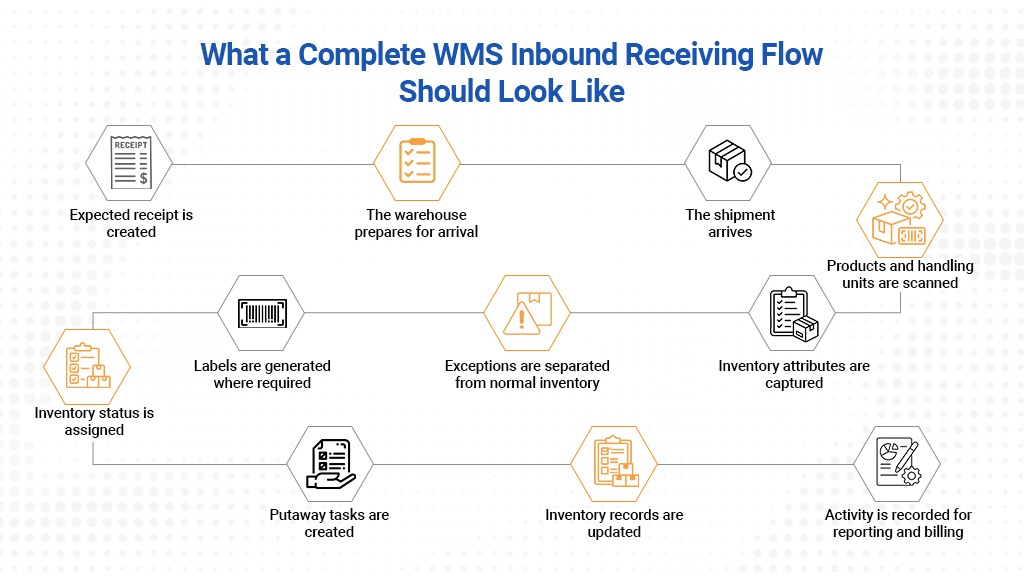
What a Complete WMS Inbound Receiving Flow Should Look Like
A strong inbound process connects each activity rather than treating receiving as a single transaction.
A typical flow may look like this:
Expected receipt is created
The WMS receives or creates the purchase order, ASN, transfer, or inbound order.
The warehouse prepares for arrival
The receiving team can see what is expected and plan labor, space, and equipment.
The shipment arrives
The worker identifies the inbound order, ASN, or shipment.
Products and handling units are scanned
The WMS validates items and quantities against expected information.
Inventory attributes are captured
Lot numbers, serial numbers, expiration dates, condition, and other required information are recorded.
Exceptions are separated from normal inventory
Shortages, overages, damages, and unexpected items follow defined workflows.
Labels are generated where required
Pallets, cartons, or handling units receive trackable identifiers.
Inventory status is assigned
The WMS determines whether the stock is available, on hold, under inspection, or in another status.
Putaway tasks are created
The system directs inventory to an appropriate destination.
Inventory records are updated
The warehouse and relevant users can see the current status and location.
Activity is recorded for reporting and billing
The system retains a complete transaction history and captures relevant billable services.
That is what connected inbound receiving looks like.
Common Signs Your Current Receiving Process is too Manual
A warehouse may have a WMS and still rely on a weak receiving process.
Warning signs include:
- Workers use paper forms before entering receipts later.
- Quantities are typed manually even when barcodes are available.
- Staff can receive inventory against the wrong client or order.
- Damages are recorded in emails or chat messages.
- Lot and serial information is added after receiving.
- Inventory becomes available before inspection is complete.
- Putaway locations are selected based on worker memory.
- Received inventory sits at the dock with no clear next task.
- Client billing depends on manual activity logs.
- Managers cannot measure dock-to-stock time accurately.
These are not isolated receiving problems. They indicate that the software is recording only part of the operation.
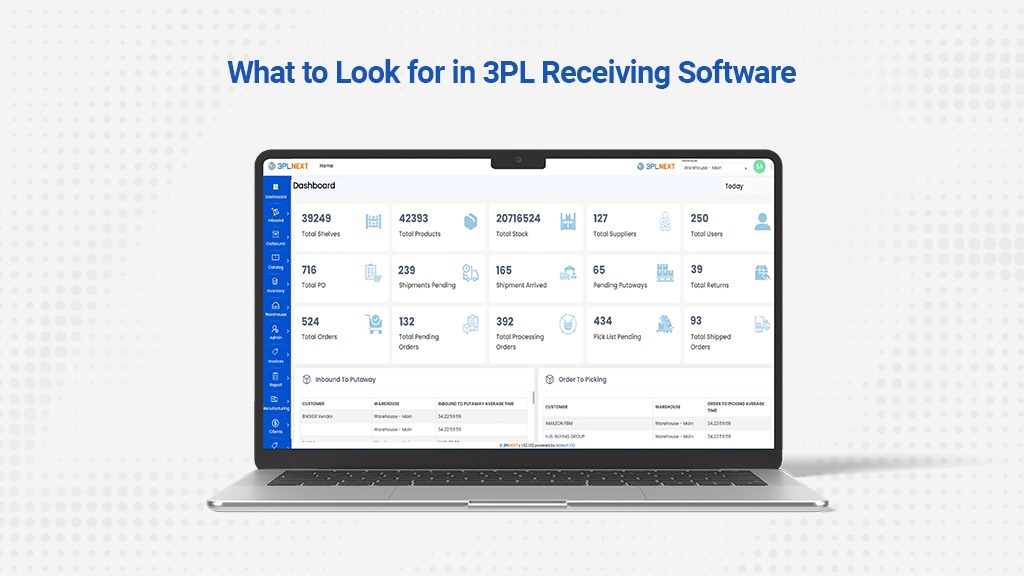
What to Look for in 3PL Receiving Software
When evaluating a WMS for inbound operations, do not ask only whether the system has a “receiving module.”
Ask what the software actually controls.
A capable system should support expected receipts, ASN processing, scan-based receiving, quantity validation, inventory attribute capture, exception handling, status control, label generation, directed putaway, audit trails, reporting, and client-specific workflows.
For 3PL operations, it should also support multiple clients within the same warehouse while keeping inventory, rules, users, reporting, and billing activity properly separated.
The best 3PL warehousing software does not force every client into the same receiving process. It gives the warehouse enough control to standardize internal operations while still supporting customer-specific requirements.
Conclusion
The receiving dock is where physical inventory and digital inventory first meet.
A good WMS should make sure they match.
It should know what is expected, guide workers through what actually arrived, validate every important detail, isolate exceptions, control inventory availability, direct putaway, and create a complete record of the work performed.
For 3PLs, the requirements go further. Receiving must work across multiple clients, inventory rules, product types, and billing arrangements without creating confusion at the dock.
That is the standard businesses should expect from modern 3PL inventory management software.
Because a WMS should do more than confirm that a shipment arrived.
It should make sure the warehouse knows exactly what arrived, what condition it is in, who it belongs to, where it should go, and what needs to happen next.




Leave a Reply