
How to Onboard New 3PL Clients Without Disrupting Your Warehouse Operations
How to Onboard New 3PL Clients Without Disrupting Your Warehouse Operations
A new client’s inventory arrives on Monday morning. The receiving team discovers that the carton barcodes do not match the product file. Several orders need packaging that has not been delivered. Meanwhile, supervisors are answering setup questions instead of clearing the outbound queue for existing customers.
The problem started before the truck reached the dock. The warehouse accepted a launch date without confirming that the operation was ready to support it.
Successful 3PL client onboarding connects what was promised during the sales process with what warehouse teams, systems, and billing processes can consistently deliver. Done well, it gives the new client a reliable start while protecting the service levels of customers already using the facility.
This guide explains how to organize that transition, from the initial handoff through the first billing cycle. It also includes an onboarding checklist, practical testing scenarios, and a readiness scorecard for deciding when to launch and when to hold back.
What Is 3PL Client Onboarding?
3PL client onboarding is the process of preparing a third-party logistics operation to receive, store, fulfill, report on, and bill for a new client’s inventory and orders. It covers commercial requirements, product data, warehouse processes, system connections, staff training, and launch validation.
Creating a customer account in a warehouse management system is one part of that process. A working operation also needs the correct stock, handling instructions, order rules, shipping arrangements, and people available to execute them.
For a 3PL adding a client to an established warehouse, onboarding should build on existing processes wherever they fit. Client-specific requirements need to be identified and tested so they do not accidentally change another account’s inventory, workflows, or service.
The 3PL Client Onboarding Checklist at a Glance
Use these stages as approval points. Each stage should produce evidence that the next activity can proceed, rather than simply a completed task on a project plan.
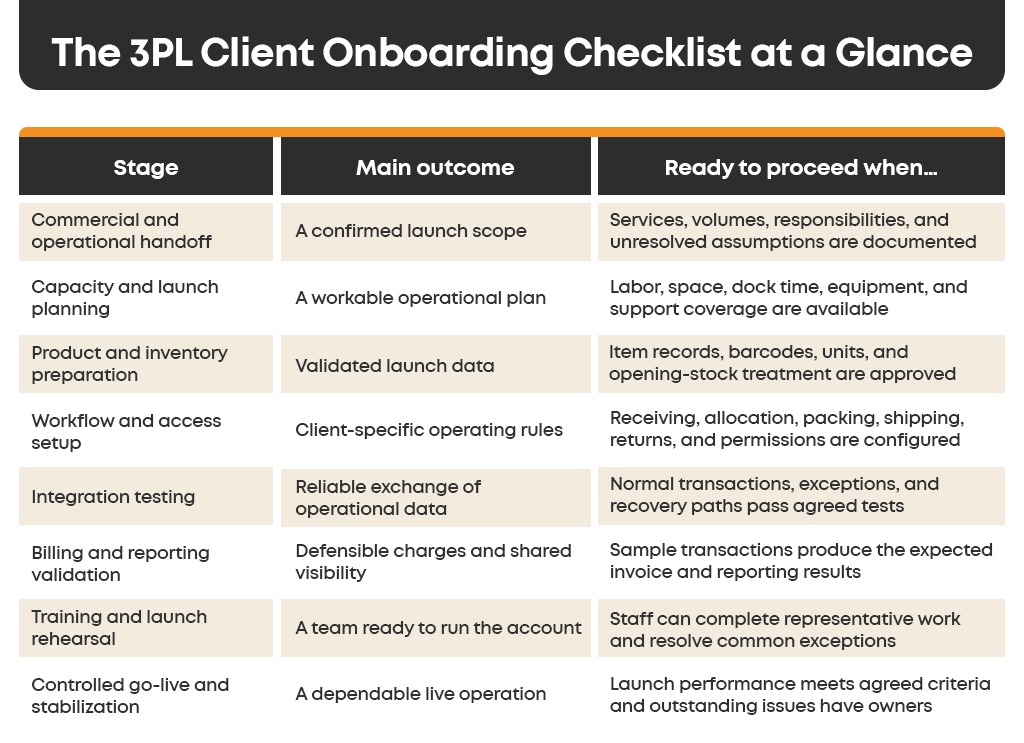
Some activities can run in parallel. For example, staff can prepare warehouse locations while the integration team tests order messages. Both activities still need approved requirements and a shared launch plan.
- Turn the Sales Handoff into an Operating Agreement
Start with a structured handoff involving the account owner, warehouse operations, systems support, finance, and the client’s operational contact.
Review what has been sold against what the facility will actually do. A statement such as “same-day fulfillment” needs an order cutoff, time zone, eligible order definition, stock-availability rule, and agreed treatment of held or incomplete orders.
Similarly, “custom packaging” should identify the materials, who supplies them, assembly instructions, replenishment responsibility, and what happens if supplies run out.
Create a short operating document with the approved launch scope and the decisions still outstanding. Separate requirements that must work on day one from services that can be introduced later. A new retail channel, an additional warehouse, or a complex kitting program should have its own readiness check if it is outside the initial scope.
Use this handoff to challenge unsupported assumptions. Is the expected daily volume an average, a peak, or a forecast? Does the client’s “standard order” contain one item or several cartons? Will the first receipt contain saleable stock only, or damaged and returned goods as well?
WSI’s published onboarding process includes internal and client kickoffs, documented requirements, process mapping, pricing review, and order testing. This provides a useful industry example of treating onboarding as a shared operational project.
Source: WSI’s 3PL onboarding guidance.
Give Each Decision a Named Owner
One person should coordinate the launch, but that person should not have to guess on behalf of every function.
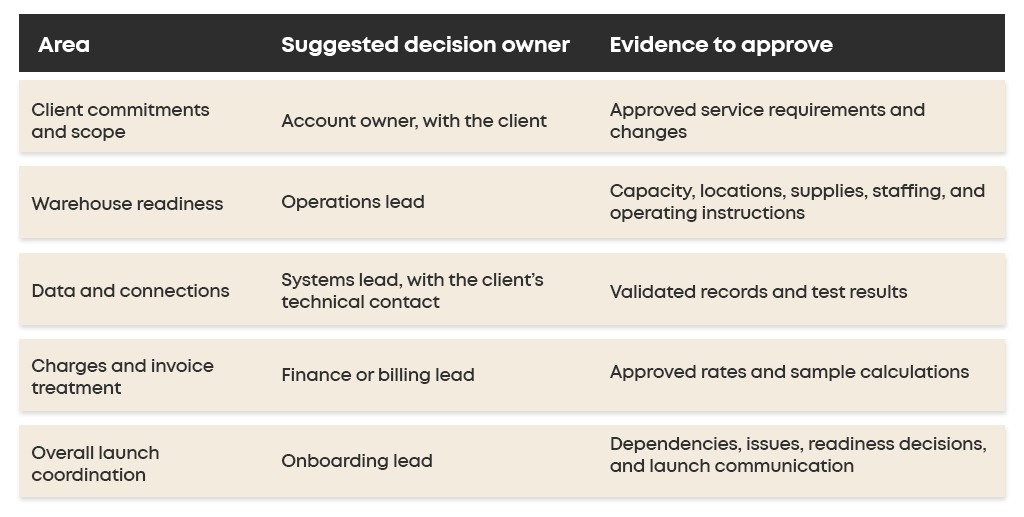
Small teams can combine roles. What matters is that each decision has an owner and an agreed escalation route.
- Reserve Capacity Before Confirming the Launch
An account may fit the warehouse’s storage capacity but exceed its receiving or packing capacity during the launch window.
Assess the first inbound shipment separately from recurring demand. Initial stock transfers can create concentrated unloading, checking, labeling, and putaway work. That workload may be much heavier than the client’s normal replenishment pattern.
Check dock appointments, staging space, storage locations, replenishment effort, picking routes, packing stations, printers, scanners, and carrier collections. Include the time experienced employees will spend training others and answering launch questions.
Plan in Workload, Not Only Order Counts
Consider a hypothetical new client expecting 300 orders a day with four order lines on average. That creates 1,200 daily order lines. If a relevant trial indicates 60 lines picked per productive labor hour, picking alone would require about 20 productive hours:
300 orders × 4 lines ÷ 60 lines per hour = 20 productive picking hours
This illustration excludes receiving, replenishment, packing, breaks, exceptions, and supervision. It is not an industry benchmark or a staffing recommendation. It shows why “300 orders” is insufficient information for capacity planning.
Validate assumptions with the client’s order profile and your own observed performance. Account for when the work arrives: a late afternoon order surge can create a bottleneck even when daily totals look manageable.
Protect Existing Client Commitments
Set launch limits that the warehouse can actively enforce. These might include a maximum inbound quantity per appointment, an initial order-release limit, or a restricted set of products and channels.
Assign launch support without leaving existing operations short of supervision. If additional volume needs employees or equipment that are not yet available, reduce the initial scope or move the date.
Keep a baseline for existing-client backlog, on-time dispatch, and exception volume. A new account is not stabilizing successfully if its progress depends on repeatedly delaying other clients’ work.
- Validate Product Data and Opening Inventory
Ask for launch data early enough to correct it before inventory arrives. A file that imports successfully can still contain inaccurate dimensions, ambiguous units, or barcodes that do not match the physical products.
Review the fields that actually drive your operation:
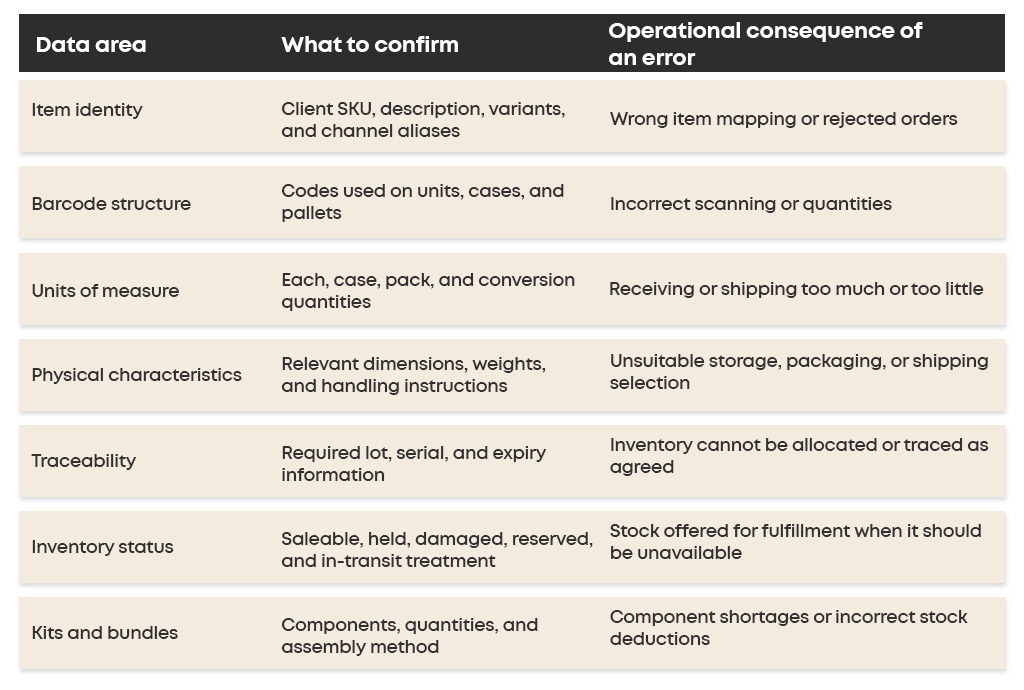
For example, if one carton contains 12 units, receiving 10 cartons may represent 120 units of stock. The system and staff need to agree on what the scanned barcode represents. Otherwise, a technically valid receipt can create the wrong balance.
Expandly’s operational onboarding questionnaire asks clients about unit and carton barcodes, mixed-SKU cartons or pallets, tracking requirements, and first inbound shipment details before configuration and receipt. These are useful categories to include in your own data request. Source: Expandly’s 3PL onboarding questionnaire.
Define How Opening Stock Becomes Available
If inventory is moving from another provider, agree on the source balance, transfer references, in-transit stock, open orders, and the point at which the new warehouse assumes fulfillment responsibility.
Do not combine an imported opening balance and a normal receipt in a way that counts the same physical stock twice. Decide whether transferred quantities enter as expected stock awaiting receipt or through a controlled opening-balance process.
Reconcile actual receipts by the dimensions that matter: client, SKU, quantity, location, inventory status, and lot or serial where required. Record discrepancies and ownership of the investigation. Release stock for fulfillment only after it meets the agreed acceptance rules.
Reliable warehouse inventory tracking then provides the continuing record of quantities, locations, and movements. Its usefulness depends on starting with a balance the warehouse can explain.
- Configure Workflows Without Changing Other Clients’ Operations
Use a proven operating template as a starting point, then review every client-specific difference. Copying another account’s setup without checking it can also copy incorrect packing rules, charges, permissions, or carrier settings.
Define the receiving method, discrepancy handling, putaway approach, stock rotation, order allocation, picking method, packing requirements, shipping service selection, and returns process.
For B2B orders, confirm requirements such as carton labels, pallet configuration, appointment information, and customer-specific documents where applicable. For ecommerce orders, check inserts, branded packaging, bundles, and split-shipment behavior.
Write the instructions where the team will use them. A packing requirement buried in an email thread is unlikely to be applied consistently across shifts.
Keep Ownership and Access Explicit
Physical storage arrangements and inventory ownership are related but separate decisions. Some operations need dedicated space; others can use shared areas while maintaining clear client ownership in the WMS. Confirm which arrangement fits the goods, agreement, and warehouse controls.
Test for duplicate SKU codes across clients. Two customers may both use a code such as “BLACK-M.” The system must distinguish the owner when receiving, allocating, counting, and reporting that inventory.
Create client and staff access according to their responsibilities. Test that a client user can see the intended records and cannot access another client’s stock, orders, invoices, or reports. Check downloadable reports as well as on-screen views.
This is one reason multi-client management software matters during onboarding: client-specific inventory, workflows, billing structures, and visibility need to coexist within the warehouse.
- Test Integrations Across the Complete Order Journey
Connecting an ecommerce platform, ERP, or order feed is a starting point. The onboarding test must establish what happens to the order and inventory information after the connection is active.
Agree which system controls each data element. The client’s commerce platform may originate orders, while the WMS manages warehouse stock and fulfillment status. Confirm how edits, cancellations, stock availability, and shipment confirmations move between them.
Map service codes, warehouse identifiers, item aliases, units, and required order fields. Document how quickly messages are expected to arrive and who investigates missing or rejected transactions.
Check the exact scope of available 3PLNext integrations against the client’s requirements. A listed connection should still be validated for the intended workflow, account configuration, and transaction types.
Include Exceptions in the Test Plan

Use test environments when available. Keep test transactions from unintentionally updating live inventory, sending customer messages, purchasing postage, or releasing work to the floor. Any necessary production test should have an agreed scope and reconciliation process.
After a test shipment, verify the quantity shipped, remaining stock, order status, tracking information, and any associated charge. A shipping label alone does not prove that the complete workflow passed.
- Validate Billing Before the First Billable Activity
Include billing in onboarding while the operational rules are being defined. Waiting until month-end can leave finance reconstructing charges from incomplete records.
Agree on the charging unit and trigger for each service. Receiving might be charged by pallet or carton. Storage might use daily occupancy or reserved capacity. Fulfillment might include a base fee and additional picks. Returns and special projects may have separate rates or be included in another fee.
Enter the applicable rates, effective dates, billing periods, minimums, inclusions, and authorized discounts. Confirm who receives invoices and what supporting detail the client needs.
Run sample transactions through billing and compare the results with independently calculated expected charges. Include a storage-period boundary, an additional pick, a return, and a nonstandard service if those are in scope. Verify that bundled or waived services are treated correctly.
Automated 3PL billing can help connect recorded activities with invoicing. The onboarding task is to establish that the configured rules match the agreement before normal volume starts.
Agree on the Meaning of Client Reports
Inventory reports should make clear whether a figure represents on-hand, available, allocated, or held stock. Order reporting should distinguish a received order from one released, packed, or shipped.
Review a sample report with the client before launch. Different definitions of “available inventory” can generate unnecessary escalations even when both systems contain the same underlying transactions.
- Train the Team and Rehearse the Launch
Training should ask employees to perform the work they will own. A receiving operator needs to identify the right client and item, handle a quantity discrepancy, and record the correct stock status. A packing operator needs to apply the agreed packaging and recognize when an order should be held.
Use representative products, documents, devices, and packing materials. Include staff from the shifts that will actually run the account. Train a backup so the workflow does not depend on one employee being present.
Give each role a concise instruction sheet covering the standard process, the common exceptions, and the escalation contact. Include photographs or an approved packing sample when appearance matters.
Rehearse the launch from receiving through fulfillment, inventory updates, reporting, and draft billing. Confirm that people can execute the process with the actual devices and supplies. Record failures and retest the affected steps after changes.
The client also needs preparation. Show its users how to submit orders or inbound information, check inventory, interpret exceptions, request changes, and contact the right person. Agree on a communication channel and response expectations during the launch window.
- Launch in Controlled Stages and Stabilize the Account
Start with a defined slice of work that exercises the real operating model. Depending on the client, this could be one channel, one product group, one warehouse, or a limited quantity of orders.
Choose the pilot carefully. Launching only single-item orders will not demonstrate readiness for the complex bundles that make up much of the expected workload. Include representative complexity while keeping the volume manageable.
Before enabling order routing, establish what happens to open work at the previous fulfillment location. Each order needs a clear fulfillment owner. Reconcile remaining orders and inventory so two locations do not dispatch the same demand.
At each expansion point, review the new client’s results and the effect on existing operations. Increase volume only when staffing, system behavior, inventory accuracy, and outstanding exceptions support the next step.
Define Pause and Recovery Rules
Specify who can pause new order releases and what triggers that decision. Examples include unexplained inventory differences, duplicate order creation, incorrect shipping labels, or a growing backlog that threatens agreed cutoffs.
A pause plan should explain how unprocessed orders are held, how in-progress work is identified, who informs the client, and how transactions will be reconciled before restarting.
Physical operations cannot always be reversed by restoring a software setting. Inventory may already be moved, parcels may have left the building, and the client may have received shipment notifications. Recovery must account for the actual state of the work.
Keep Ownership Through Stabilization
Maintain a short daily launch review while the operation settles. Review exceptions by cause and assign each one an owner, next action, and due date. Update the operating instructions when a decision changes the process.
End heightened launch support when the agreed exit criteria are met. These should include stable fulfillment performance, reconciled inventory, dependable data exchange, staff independence, and validated billing. If the first invoice falls later, keep that validation task open with finance even after daily launch meetings end.
A Go-Live Readiness Scorecard
Use a red, amber, or green status for each area. Record the evidence, owner, and unresolved issue beside the status.
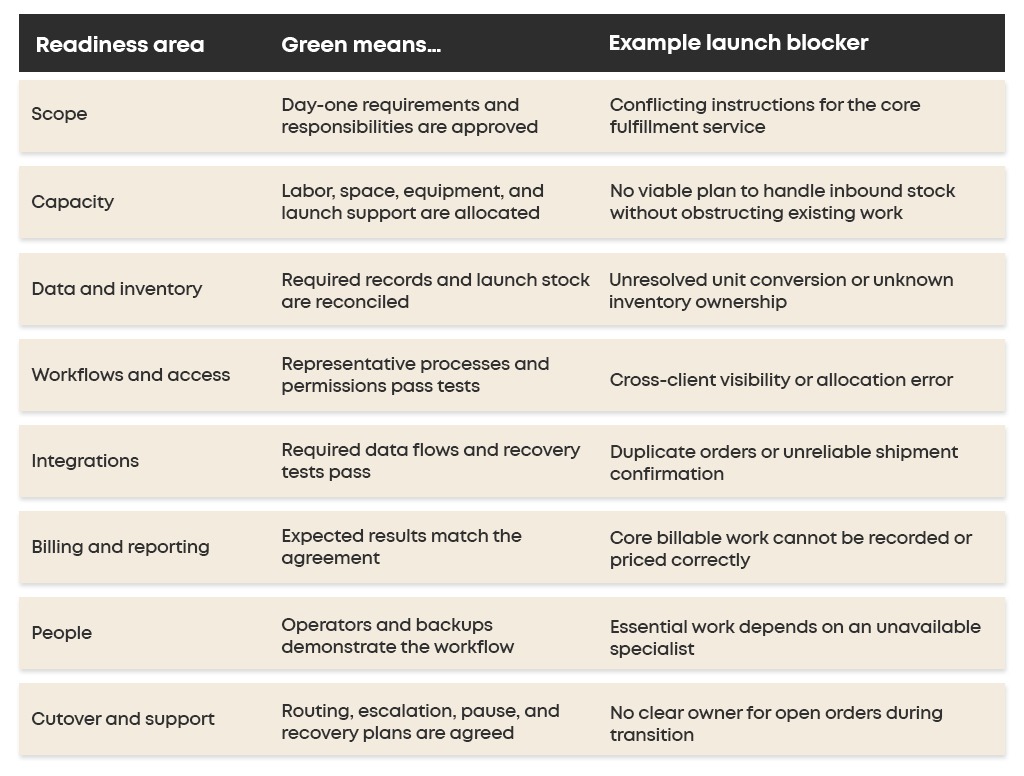
Do not average these statuses into a score that hides a critical failure. Seven green areas do not compensate for stock being allocated to the wrong client.
An amber item needs a documented impact, workable temporary control, named owner, and resolution date. If it affects launch scope, the client and relevant internal owners should agree on the limitation before work begins.
This is a suggested operating framework, not a universal certification standard. Tailor the decision criteria to the account’s complexity and service commitments.
How Long Should 3PL Client Onboarding Take?
The timeline depends on the work required to become operationally ready. An account with clean product data, an established connection, and standard fulfillment rules requires a different plan from a multi-warehouse client with custom integrations and a large stock transfer.
Estimate the schedule by dependency. Identify when product data will be approved, packaging will arrive, stock can be received, system testing can finish, and trained staff will be available. The launch date must accommodate the longest unresolved dependency.
Build in time for correcting and retesting problems. A plan that assumes every import and integration test will pass on the first attempt leaves no room for normal implementation work.
Reduce onboarding time by reusing approved templates, issuing clear data requests, making decisions promptly, and testing early. Keep a distinction between the time required to configure an account and the time required to validate a live warehouse operation.
Measure Onboarding Success Beyond the First Shipment
The first successful shipment is an important milestone. It is not enough to show that the account can operate consistently at the intended volume.
Use a small set of measures during stabilization:
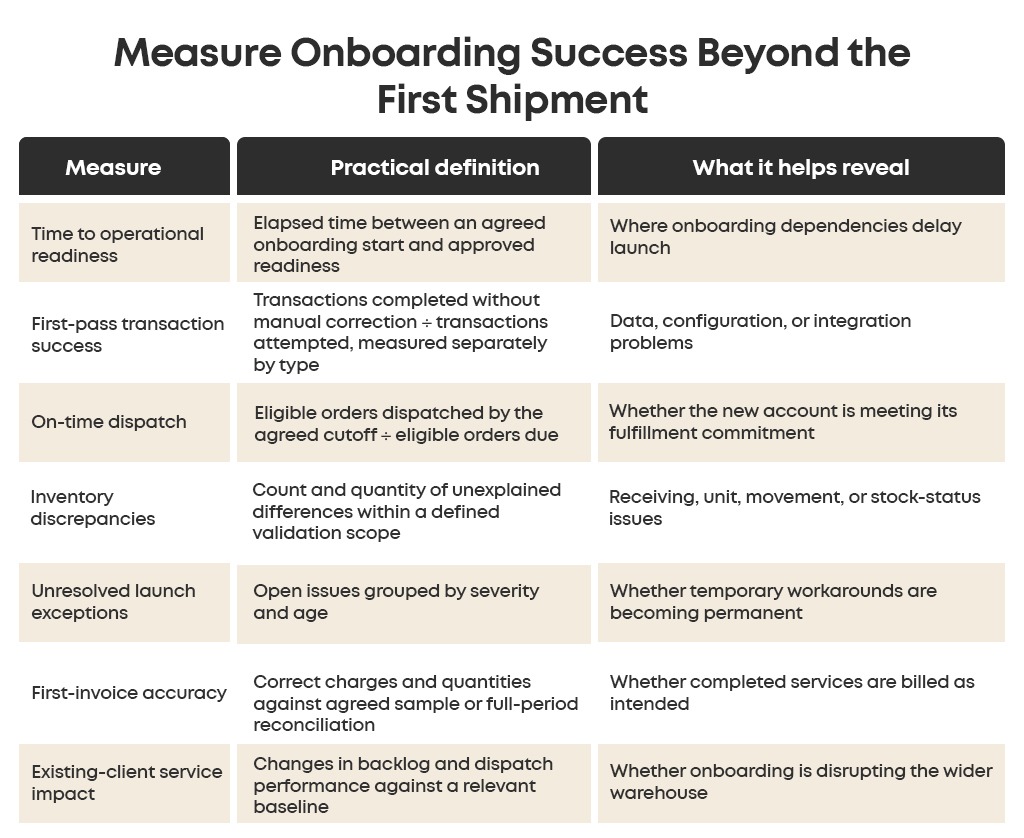
Use consistent definitions and account for changes in order mix, volume, and staffing before attributing a performance change to onboarding alone. For a wider reporting framework, see 15 warehouse KPIs every 3PL should track.
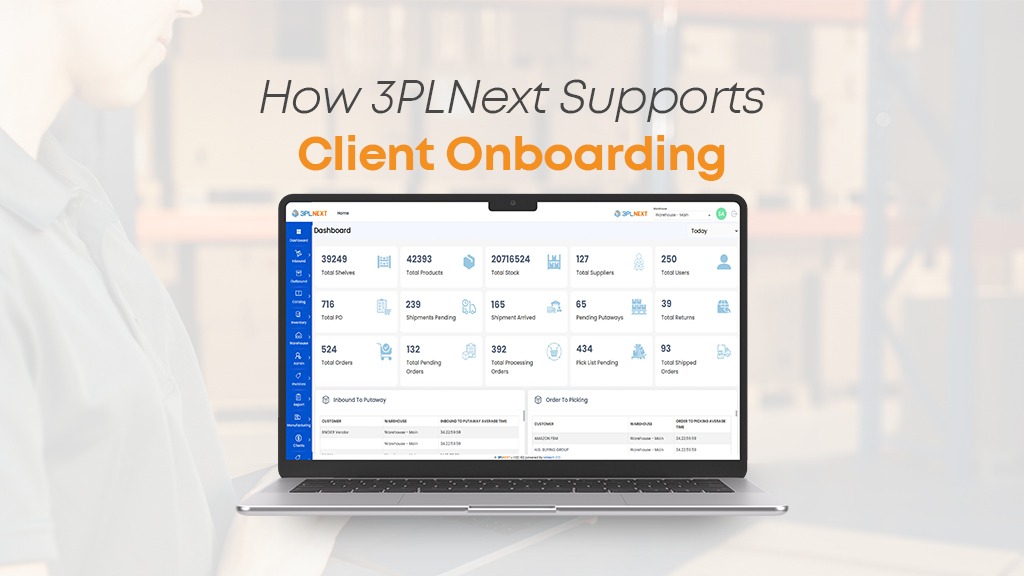
How 3PLNext Supports Client Onboarding
3PLNext’s multi-client capabilities support separate inventory ownership, customer-specific workflows, client portals, role-based access, and client-specific billing rules. These provide a foundation for managing different customer requirements within the same warehouse operation. Explore 3PLNext’s multi-client management capabilities.
When evaluating 3PL WMS software, use a sample account to demonstrate the complete journey: receiving stock, allocating an order, applying packing instructions, shipping, updating client visibility, and producing the expected charge. Include an exception so the team can see how the process behaves when information is incomplete or a transaction needs correction.
The value of a cloud-based 3PL software platform depends on how well its configuration supports the actual operating agreement. Confirm integration scope, specific workflow requirements, and any implementation work during discovery.
Request a 3PLNext demo to review your client onboarding requirements and explore how inventory, fulfillment, billing, and client visibility can work together.
Frequently Asked Questions
What information should a new 3PL client provide before onboarding?
Request the product master, SKU and barcode information, units of measure, handling requirements, order profile, inventory-transfer plan, system connections, packaging instructions, shipping preferences, agreed rates, and operational contacts. Tailor the request to the launch scope and resolve missing information before activating the affected process.
How can a 3PL onboard client faster?
Reuse approved workflow templates, standardize data collection, assign decision owners, and test requirements early. Run independent tasks in parallel where practical. Separate essential launch requirements from later enhancements so optional work does not delay a viable initial scope.
How do you prevent onboarding from affecting existing clients?
Reserve capacity, plan initial receipts, limit launch volume, and provide dedicated support coverage. Monitor existing-client backlog and dispatch performance during the transition. Expand the new account only when the warehouse can support the next stage without compromising agreed service levels.
Should a new client launch with every SKU and sales channel at once?
That depends on the operating model and transition constraints. A staged launch can make validation and recovery more manageable, provided order routing and inventory availability are clearly controlled. The initial scope should still include representative workflows rather than only the easiest orders.
What is the difference between WMS implementation and 3PL client onboarding?
WMS implementation establishes or replaces the warehouse’s core software and operating configuration. Client onboarding prepares a particular customer to use the warehouse’s services, often within an existing WMS. The two overlap when a new client requires capabilities or connections the current operation does not yet support.
When is 3PL client onboarding complete?
Onboarding is complete when the agreed services operate reliably, inventory and data flows are reconciled, staff can manage routine work, and remaining support responsibilities are accepted. Include billing validation and client reporting in the exit criteria rather than ending the process after the first shipment.




Leave a Reply